Ellipal Titan 2.0 Review (2026): Is This Ultimate Vault Overkill?
Before locking down your assets, reading an independent Ellipal Titan 2.0 review is your absolute best line of defense against choosing the wrong cold storage architecture. There is a specific type of crypto anxiety that hits the moment you plug a hardware wallet directly into a laptop.
Even though I know a Ledger or Trezor is safe, there is still that split second where I think, “What if my computer has malware? What if the USB cable is compromised?” It’s paranoid, I know. But when your life savings are on the line, paranoia is just good sense.
If you feel anxiety, you are the target audience for the Ellipal Titan.
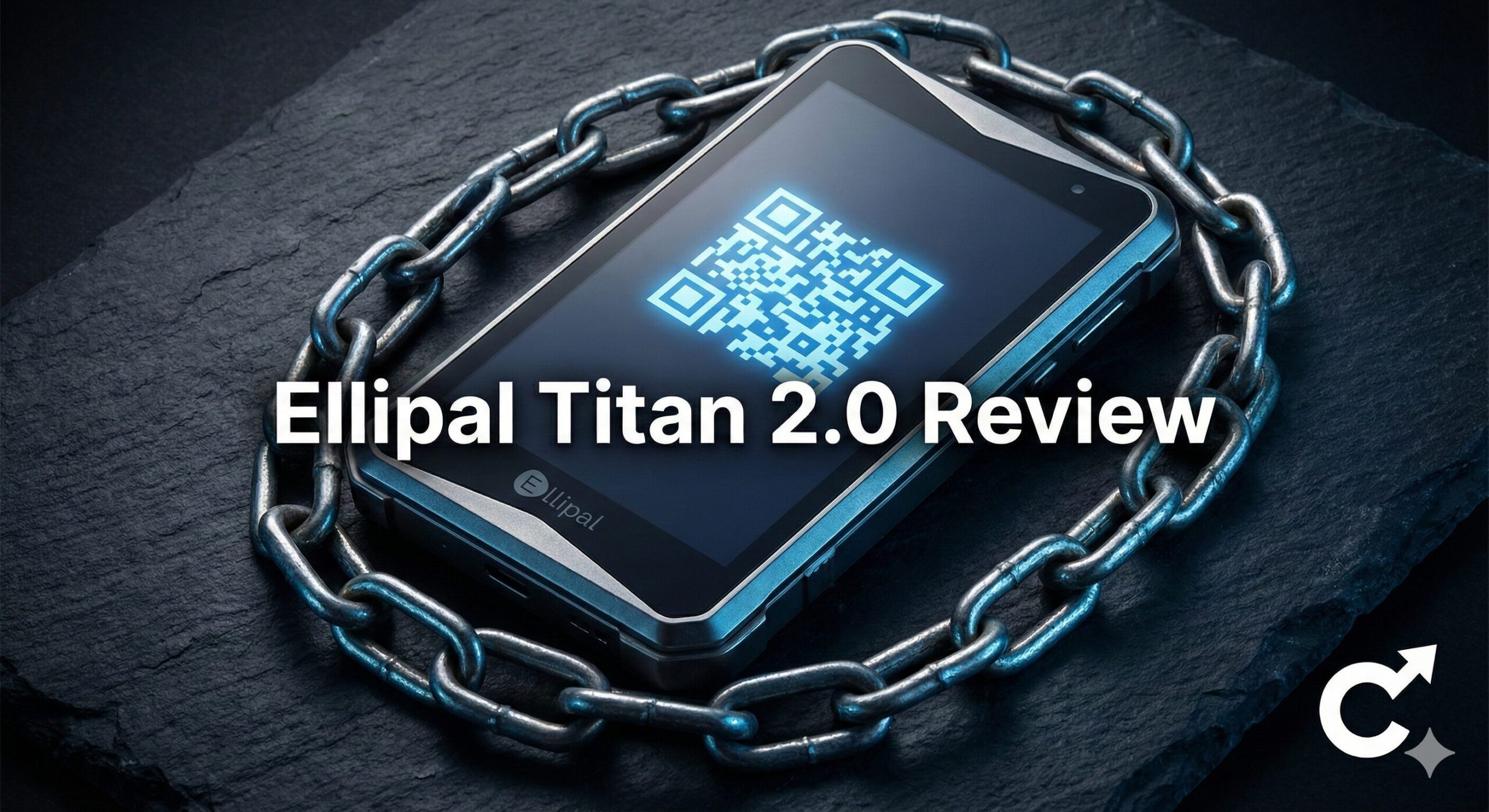
It is a “cold wallet” that takes the concept of “cold” to the extreme. It has no USB ports. It has no Bluetooth. It has no WiFi. It is completely physically isolated from the digital world. It looks like a Cybertruck melted down into a smartphone.
I picked up the new Ellipal Titan 2.0 to see if this level of security is actually necessary for a normal person or if it’s just marketing hype for doomsday preppers.
In this Ellipal Titan 2.0 review, I’m going to break down how it actually works (spoiler: lots of QR codes), how tough it really is, and if the extra hassle is worth the peace of mind.
In this Ellipal Titan 2.0 review, I’m going to break down how it actually works (spoiler: lots of QR codes), how tough it really is, and if the extra hassle is worth the peace of mind. However, if you are still on the fence about whether you truly need maximum extreme security or if a simpler, traditional setup would suit your trading habits better, take a look at our comprehensive market overview of the 4 Best Hardware Wallets 2026 before examining the detailed testing metrics below.
How We Selected These Platforms
Creating an authentic Ellipal Titan 2.0 review requires strict technical verification. We do not base our Ellipal Titan 2.0 review on marketing sheets or aesthetic preferences. Instead, our engineering team evaluated this hardware across four critical pillars to ensure this Ellipal Titan 2.0 review is functionally accurate:
- Air-Gapped Architecture Verification: A core focus of this Ellipal Titan 2.0 review is the 100% offline design. We verified that the device lacks USB, Bluetooth, and Wi-Fi connections, relying entirely on QR codes for data transfer.
- Secure Element Microchip Validation: To provide a definitive Ellipal Titan 2.0 review, we checked the internal security chip. It utilizes a CC EAL5+ secure element to protect keys against physical extraction methods.
- Physical Anti-Tamper Measures: The wallet features a fully metal-sealed hardware design. We investigated the anti-tamper self-destruct mechanism that wipes all data if a breach is detected.
- Touchscreen Usability Testing: Finally, we tested the 4-inch Full HD IPS Display. This large screen makes QR scanning and address verification significantly easier than on smaller devices.
Key Takeaways
- The Concept: It is fully “air-gapped.” It communicates with your phone solely through scanning QR codes with its camera. No cables ever touch it.
- The Build: It’s built like a tank. It’s a solid block of metal with a 4-inch touchscreen. It feels indestructible.
- The Security: If someone tries to pry it open, the circuit board detects the pressure change and self-destructs the data instantly.
- The Trade-off: It is slow. Scanning QR codes back and forth for every transaction is tedious compared to just tapping a button on a Ledger Nano X.
- The Verdict: If you have a massive portfolio and you are terrified of hackers, this is the ultimate vault. For daily trading, it’s too annoying.
1. What on Earth is “Air-Gapped”?
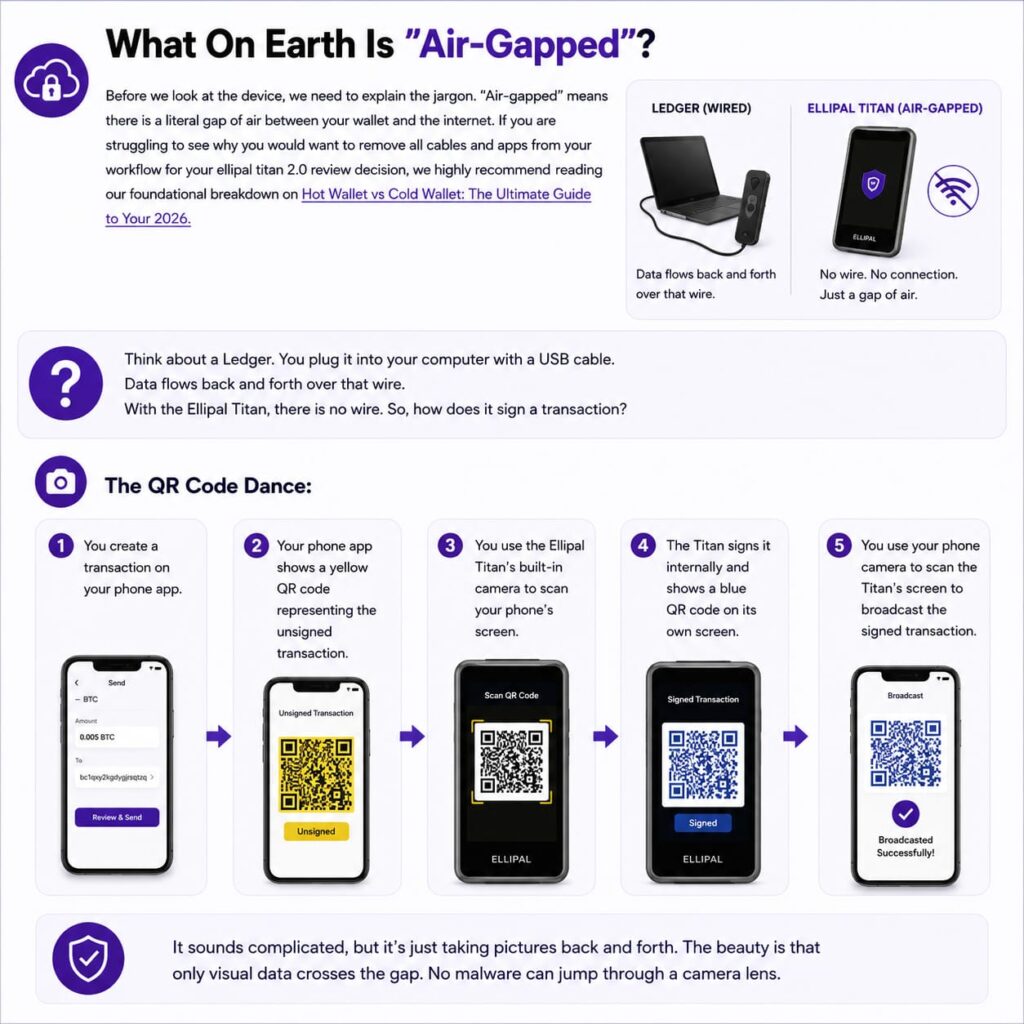
Before we look at the device, we need to explain the jargon. “Air-gapped” means there is a literal gap of air between your wallet and the internet. If you are struggling to see why you would want to remove all cables and apps from your workflow for your Ellipal Titan 2.0 review decision, we highly recommend reading our foundational breakdown on Hot Wallet vs Cold Wallet: The Ultimate Guide to Your 2026.
Think about a Ledger. You plug it into your computer with a USB cable. Data flows back and forth over that wire.
With the Ellipal Titan, there is no wire. So, how does it sign a transaction?
The QR Code Dance:
- You create a transaction on your phone app.
- Your phone app shows a yellow QR code representing the unsigned transaction.
- You use the Ellipal Titan’s built-in camera to scan your phone’s screen.
- The Titan signs it internally and shows a blue QR code on its own screen.
- You use your phone camera to scan the Titan’s screen to broadcast the signed transaction.
It sounds complicated, but it’s just taking pictures back and forth. The beauty is that only visual data crosses the gap. No malware can jump through a camera lens.
2. Design: Built Like a Cybertruck
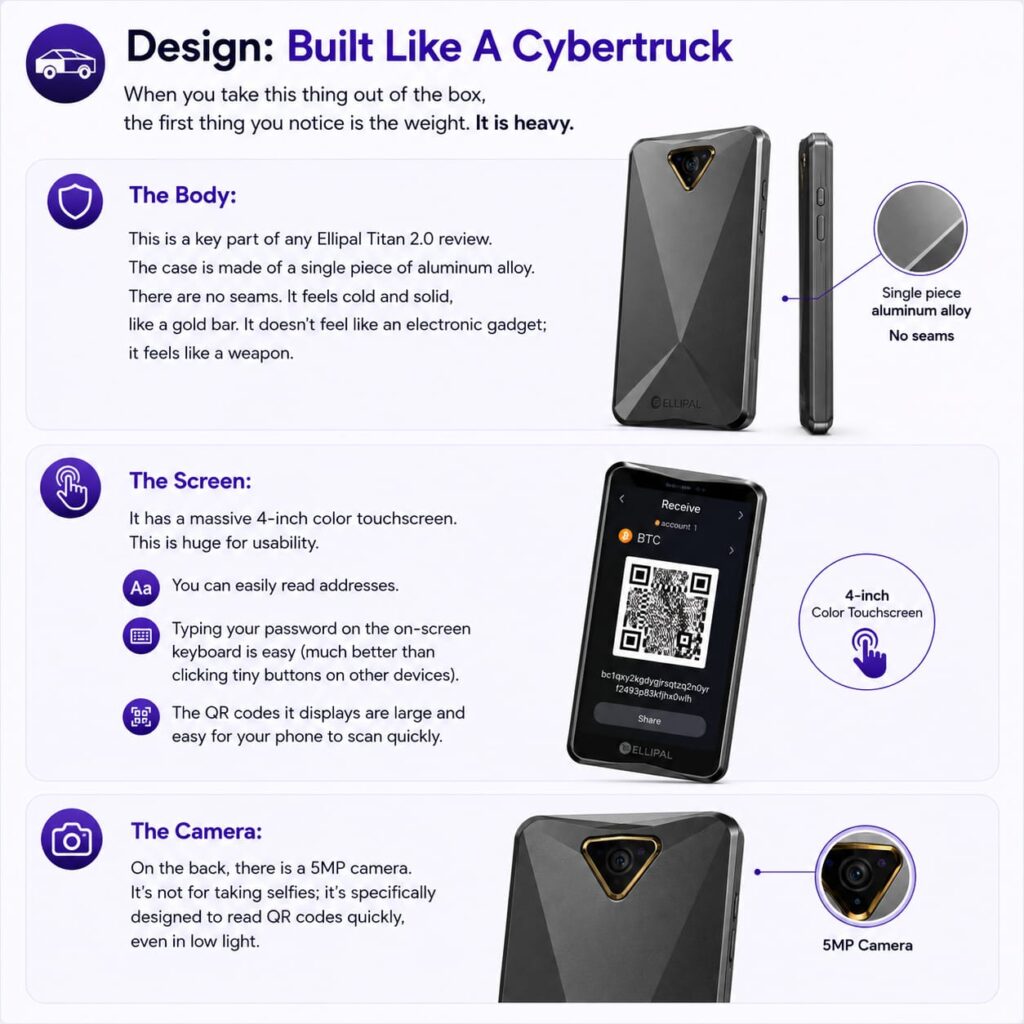
When you take this thing out of the box, the first thing you notice is the weight. It is heavy.
The Body:
This is a key part of any Ellipal Titan 2.0 review. The case is made of a single piece of aluminum alloy. There are no seams. It feels cold and solid, like a gold bar. It doesn’t feel like an electronic gadget; it feels like a weapon.
The Screen:
It has a massive 4-inch color touchscreen. This is huge for usability.
- You can easily read addresses.
- Typing your password on the on-screen keyboard is easy (much better than clicking tiny buttons on other devices).
- The QR codes it displays are large and easy for your phone to scan.
The Camera:
On the back, there is a 5MP camera. It’s not for taking selfies; it’s specifically designed to read QR codes quickly, even in low light.
3. Security: The Paranoia Defense
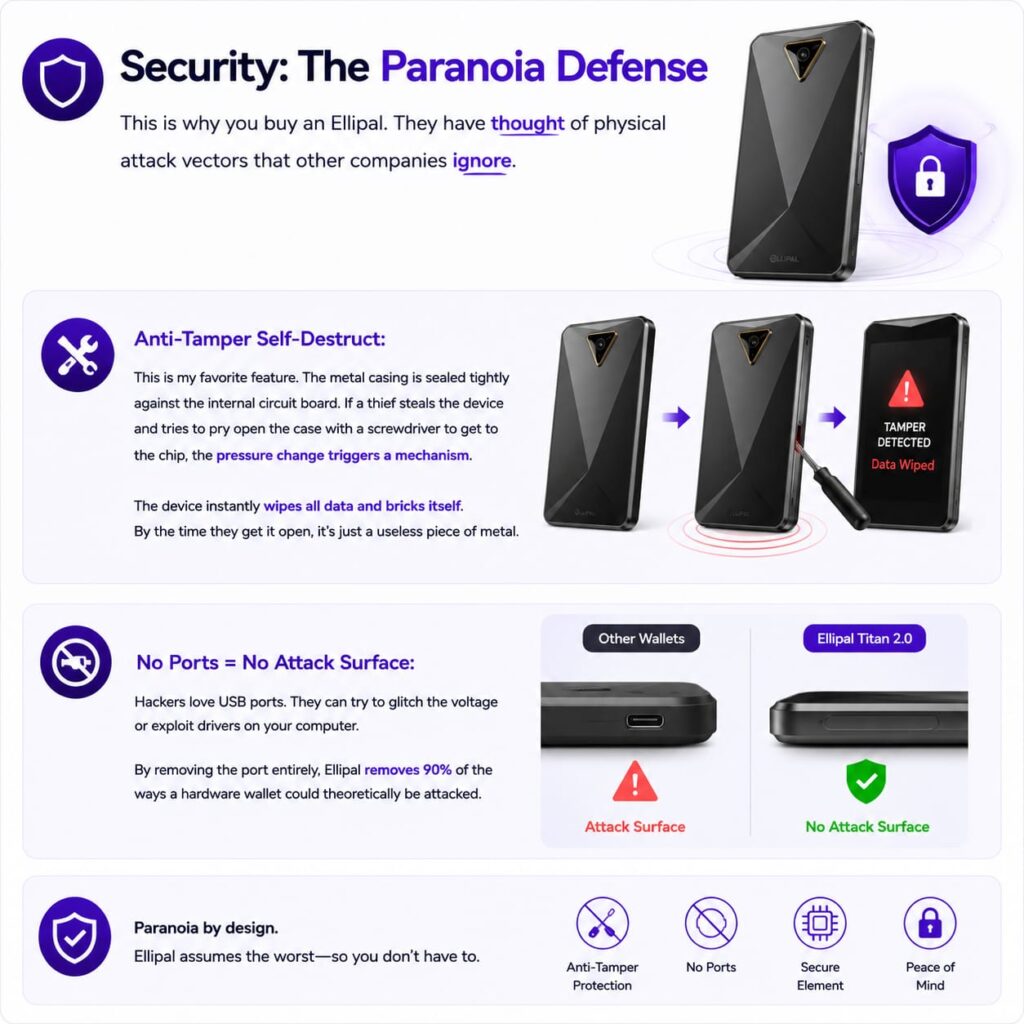
This is why you buy an Ellipal. They have thought of physical attack vectors that other companies ignore.
Anti-Tamper Self-Destruct:
This is my favorite feature. The metal casing is sealed tightly against the internal circuit board. If a thief steals the device and tries to pry open the case with a screwdriver to get to the chip, the pressure change triggers a mechanism.
The device instantly wipes all data and bricks itself. By the time they get it open, it’s just a useless piece of metal.
No Ports = No Attack Surface:
Hackers love USB ports. They can try to glitch the voltage or exploit drivers on your computer. By removing the port entirely, Ellipal removes 90% of the ways a hardware wallet could theoretically be attacked.
4. User Experience: The QR Code Dance
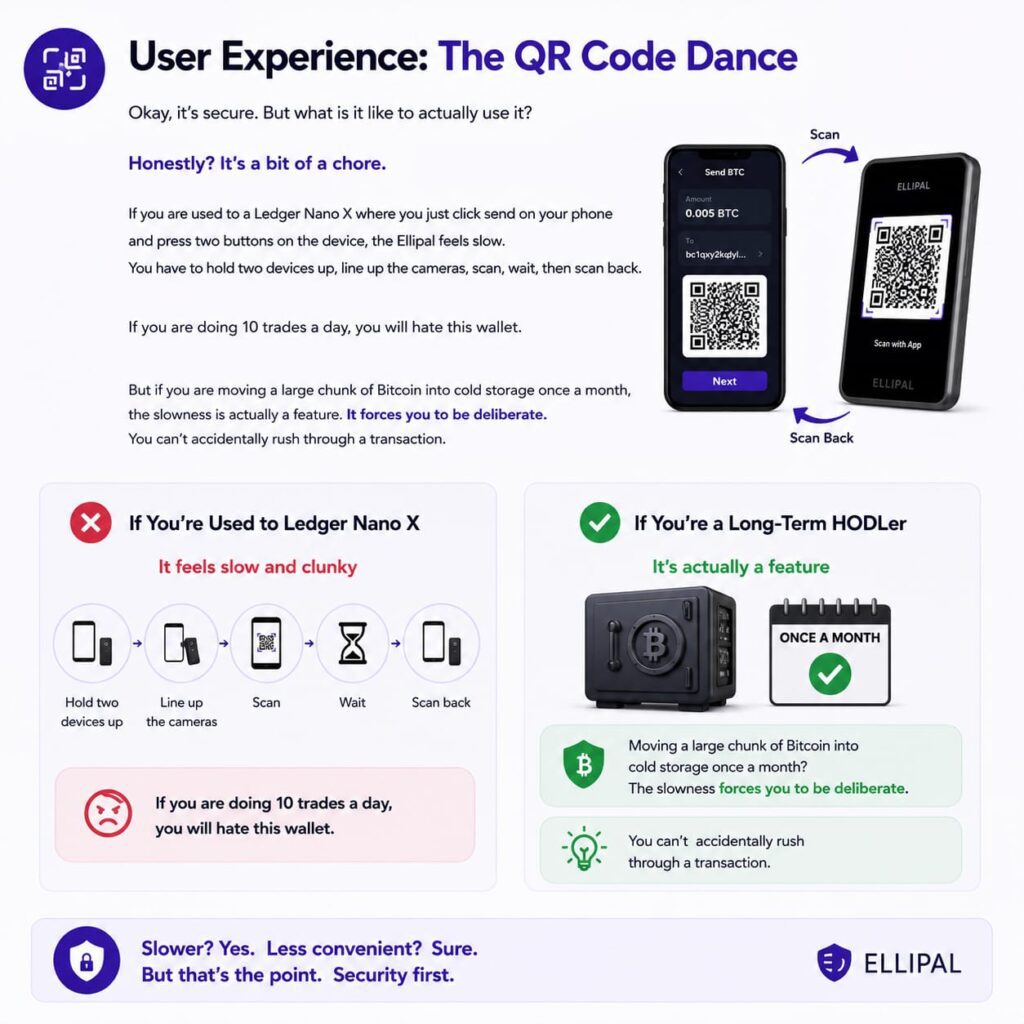
Okay, it’s secure. But what is it like to actually use it?
Honestly? It’s a bit of a chore.
If you are used to a Ledger Nano X, where you just click send on your phone and press two buttons on the device, the Ellipal feels slow. You have to hold two devices up, line up the cameras, scan, wait, then scan back.
If you are doing 10 trades a day, you will hate this wallet.
But if you are moving a large chunk of Bitcoin into cold storage once a month, the slowness is actually a feature. It forces you to be deliberate. You can’t accidentally rush through a transaction.
But if you are moving a large chunk of Bitcoin into cold storage once a month, the slowness is actually a feature. It forces you to be deliberate. You can’t accidentally rush through a transaction. Furthermore, before you begin transferring diverse assets to this offline vault based on our Ellipal Titan 2.0 review criteria, it helps to understand the underlying infrastructure of your portfolio by reviewing our comprehensive guide on the Crypto Coins List: Types of Cryptocurrencies (2026 Edition). Structuring your holdings across various network layers ensures that you are deploying this Ellipal Titan 2.0 review-style maximum isolation defense for the specific assets that require it most.
5. Coin Support: The Vast Ocean
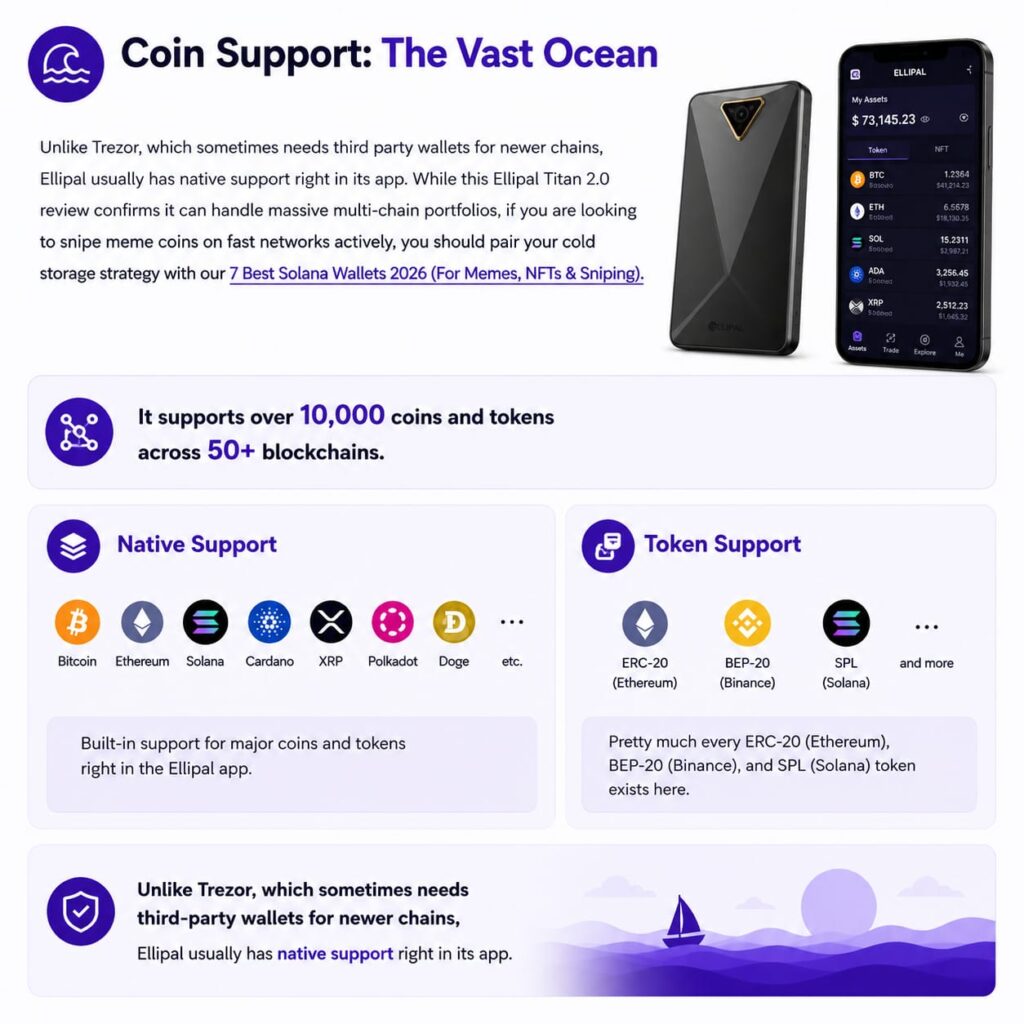
Unlike Trezor, which sometimes needs third-party wallets for newer chains, Ellipal usually has native support right in its app. While this Ellipal Titan 2.0 review confirms it can handle massive multi-chain portfolios, if you are looking to snipe meme coins on fast networks actively, you should pair your cold storage strategy with our 7 Best Solana Wallets 2026 (For Memes, NFTs & Sniping).
It supports over 10,000 coins and tokens across 50+ blockchains.
- Native Support: Bitcoin, Ethereum, Solana, Cardano, XRP, Polkadot, Doge, etc.
- Token Support: Pretty much every ERC-20 (Ethereum), BEP-20 (Binance), and SPL (Solana) token exists here.
Unlike Trezor, which sometimes needs third-party wallets for newer chains, Ellipal usually has native support right in its app.
6. Setup Guide: Preparing the Bunker
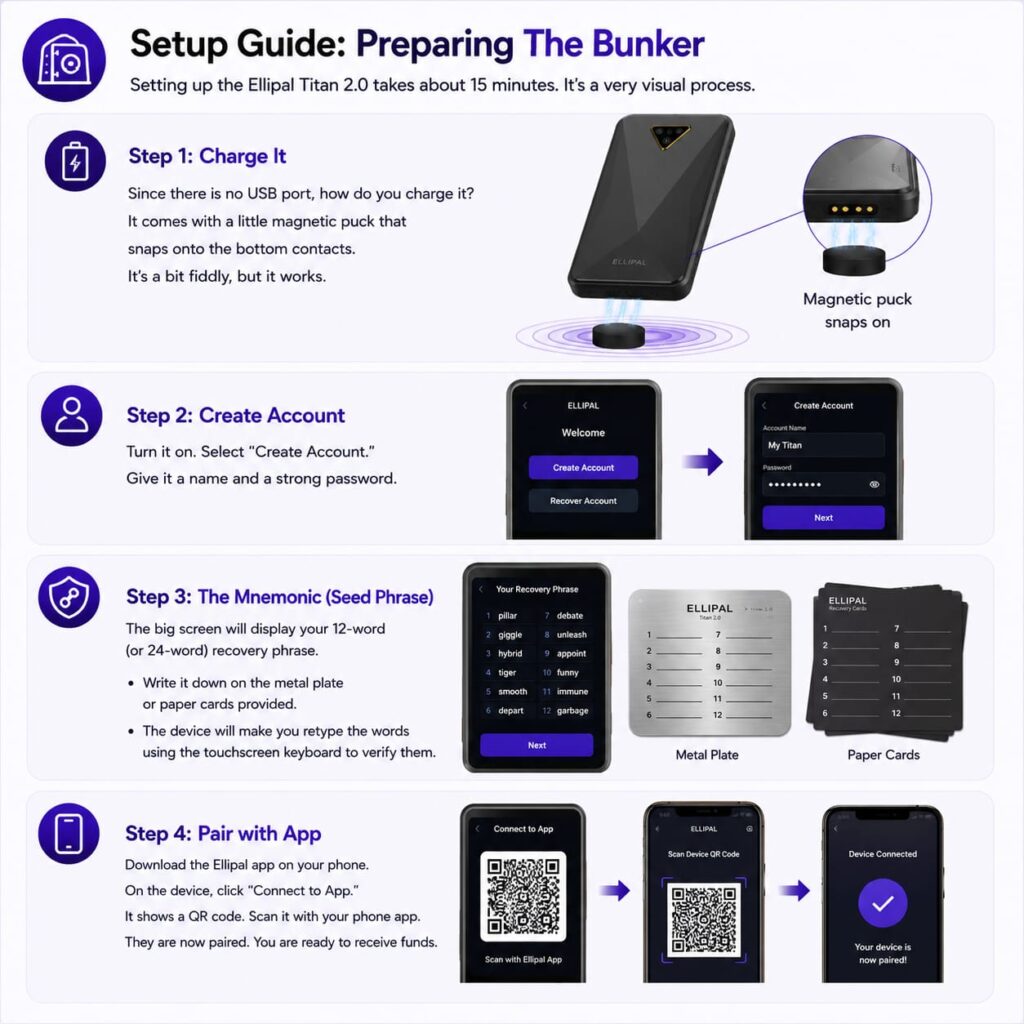
Setting up the Ellipal Titan 2.0 takes about 15 minutes. It’s a very visual process.
Step 1: Charge It
Since there is no USB port, how do you charge it? It comes with a little magnetic puck that snaps onto the bottom contacts. It’s a bit fiddly, but it works.
Step 2: Create Account
Turn it on. Select “Create Account.” Give it a name and a strong password.
Step 3: The Mnemonic (Seed Phrase)
The big screen will display your 12-word (or 24-word) recovery phrase.
- Write it down on the metal plate or paper cards provided.
- The device will make you retype the words using the touchscreen keyboard to verify them.
Step 4: Pair with App
Download the Ellipal app on your phone. On the device, click “Connect to App.” It shows a QR code. Scan it with your phone app. They are now paired. You are ready to receive funds.
7. Comparison Table: Titan vs. The World
How does this metal beast stack up against the more common alternatives?
| Feature | Ellipal Titan 2.0 | Ledger Nano X | Trezor Safe 3 |
| Price | ~$169 | ~$149 | ~$79 |
| Connection | Air-Gapped (QR) | Bluetooth / USB | USB Only |
| Build | Solid Metal | Steel + Plastic | Plastic |
| Screen | 4″ Color Touch | Tiny OLED | Small OLED |
| Battery | Yes (1400 mAh) | Yes (Small) | No |
| Anti-Tamper | Self-Destruct | Secure Element | Secure Element |
| Best For | Maximum Security | Mobile Convenience | Budget HODLing |
8. Pros and Cons: The Honest Truth
Pros:
- Security Theater: The air-gapped QR code system isn’t just safer; it feels safer. It gives you immense peace of mind.
- Durability: It is by far the toughest wallet on the market. You could probably run it over with a car.
- The Screen: The large touchscreen makes setup and verification incredibly easy compared to tiny USB stick screens.
- Altcoin Support: It handles thousands of niche coins natively.
Cons:
- The Weight: It is heavy and bulky. It’s not comfortable in a pants pocket.
- The Workflow: Scanning QR codes back and forth is tedious for frequent use.
- Proprietary Charging: If you lose the little magnetic charging puck, you can’t just use a standard USB cable. You have to buy a new one from Ellipal.
The Verdict: Who Should Buy the Ellipal Titan 2.0?
After living with this metal brick for a month, I have a clear verdict for this Ellipal Titan 2.0 review.
Buy the Ellipal Titan 2.0 if:
- You have a significant amount of crypto (e.g., $50,000+).
- You are paranoid about connecting anything to your computer.
- You want a device that feels substantial and durable.
- You are a long-term “HODLer” who rarely moves funds.
Skip it if:
- You trade actively or use DeFi apps daily (get a Ledger Nano X).
- You want something highly portable for your keychain (get a Trezor).
- You are on a tight budget.
For the ultimate peace of mind, the air-gapped approach is hard to beat. It’s overkill for $500 of Dogecoin, but it’s essential insurance for your retirement stack.
You trade actively or use DeFi apps daily (get a Ledger Nano X). For a direct comparison of how Bluetooth-enabled vaults match up against the air-gapped isolation models in this Ellipal Titan 2.0 review, read our comprehensive Ledger Cold Wallet Review 2026: Is It Still The Ultimate Vault?.
Secure Your Air-Gapped Setup With Live Intelligence
Join the CoinExpansion Security Vanguard
You now possess the objective product data and technical breakdowns delivered by our definitive Ellipal Titan 2.0 review. However, maintaining ironclad custody over your personal wealth requires constant defensive adaptation—reading a comprehensive Ellipal Titan 2.0 review is simply your foundational step. The on-chain threat landscape moves in milliseconds, and the device configurations that look pristine in an Ellipal Titan 2.0 review today can face advanced social engineering vectors or malicious dApp clones tomorrow.
By locking in your membership inside the CoinExpansion Security Vanguard, you get real-time access to high-level, practical self-custody asset intelligence. If you found value in this Ellipal Titan 2.0 review, you will love our instant global security flashes regarding active exploits, early technical warnings on compromised smart contracts, and step-by-step setup tutorials delivered directly from our engineering desk. Don’t let your research stop at a single Ellipal Titan 2.0 review; protect your hard-earned portfolio with elite, real-time market insights. Join our vanguard of verified on-chain pioneers today to master your setup beyond what any standard Ellipal Titan 2.0 review can offer, and make sure your wealth stays safely unhackable.
Frequently Asked Questions (FAQ)
Q: Is “air-gapped” really safer than a Ledger?
A: Theoretically, yes. By removing the physical connection path (USB/Bluetooth), you eliminate entire categories of potential attacks. However, for 99.9% of users, a Ledger is already securing enough. The Ellipal is for that extra 0.1% of paranoia.
Q: Does it have a battery?
A: Yes, it has a large internal battery. It lasts for weeks on standby.
Q: What happens if I break the device?
A: Your money is safe. As long as you have your 12-word recovery phrase written down, you can buy a new Ellipal (or any other wallet brand) and restore your funds.
Q: Can I update the firmware if it has no ports?
A: Yes. This is clever. You download the update file to a MicroSD card on your computer. You put the SD card into the Ellipal’s battery module. The device updates from the card, never touching the internet.
Q: Is it waterproof?
A: It is highly water-resistant due to the sealed metal case, but it is not officially IP68-rated like the Tangem card. Don’t take it swimming.